GUI Settings
These settings allow you to customize the visual appearance of the Vape Client GUI.
Blur Background
Blurs the game world behind the Vape GUI when it's open.
GUI Bind Indicator
Displays a notification showing the keybind to open the Vape GUI upon injecting the client.
Show Tooltips
Shows brief descriptions when hovering over GUI elements.
Show Legit Mode
Displays the button to switch to the Legit Modules GUI at the top of the client.
GUI Style
Controls which Vape GUI layout is used.
- Frames: Uses the classic movable frame-based GUI.
- Central: Uses the central GUI layout.
Rainbow Speed
Controls the speed at which colors cycle when using the "rainbow" color option.
GUI Scale
Adjusts the size of GUI elements. Smaller values are recommended for lower resolutions.
Search Bar Style
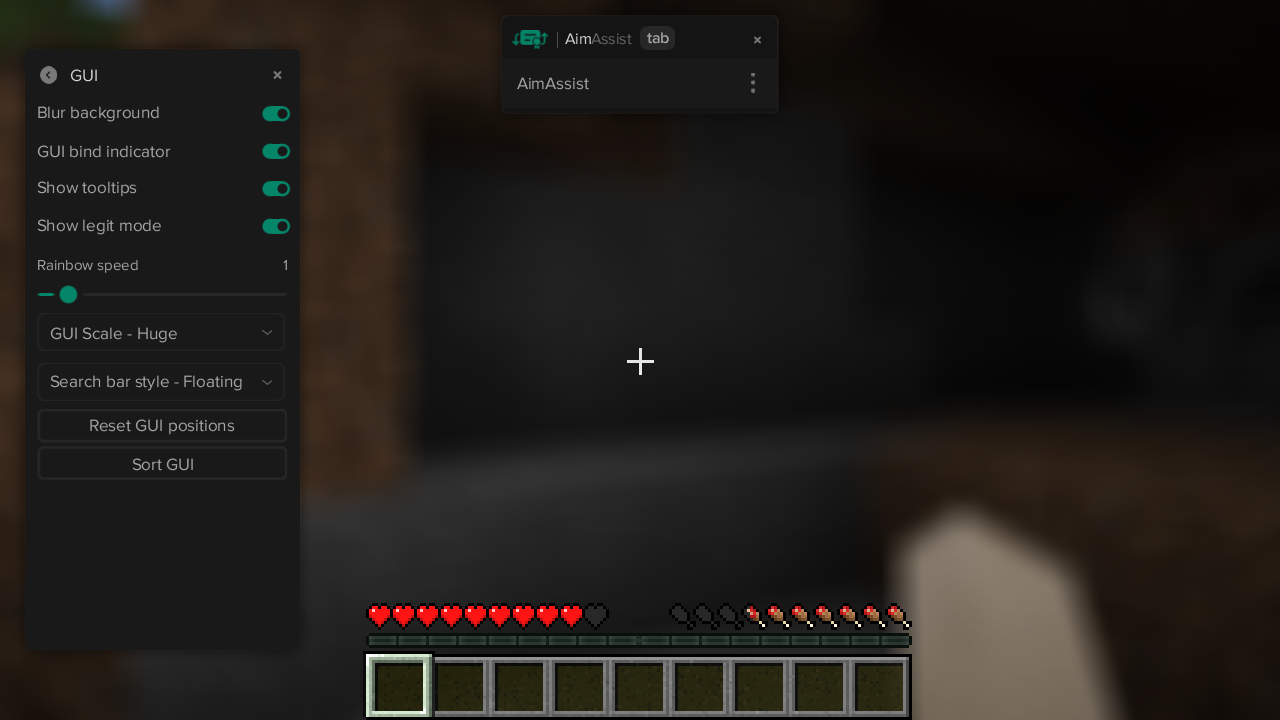
Determines the placement of the search bar for quickly finding modules.
- Floating: Places the search bar at the top center of your screen.
- None: Hides the search bar completely.
- Integrated: Embeds the search bar within the main Vape GUI.
Reset GUI Positions
Resets the positions of all GUI elements to their defaults. Useful when changing resolutions or GUI scale.
Sort GUI
Sorts all GUI elements in order of their expanded size.